Safety doesn’t happen by accident—neither does effective communication around it. In high-risk industries like construction, manufacturing, and utilities, the daily rhythm often starts not with machinery, but with a conversation. That conversation is a toolbox talk, and behind every consistent, impactful talk is a well-structured toolbox talk template.
A toolbox talk template is a standardized format used to guide short, focused safety meetings held at the job site. It ensures that critical safety topics are communicated clearly, consistently, and documented properly. More than just a checklist, it’s a tool for accountability, engagement, and risk prevention.
Yet, many teams still wing it—relying on memory or ad-hoc discussions that miss key risks or fail to document attendance. The result? Gaps in compliance, inconsistent messaging, and real safety vulnerabilities.
This guide breaks down what a toolbox talk template really is, how to use it effectively, and what separates a useful template from a forgettable piece of paper.
Why Toolbox Talks Matter in Real-World Safety
Toolbox talks—also called safety moments, tailgate meetings, or pre-job briefings—are short sessions (typically 5–15 minutes) held before work begins. They serve three core purposes:
- Hazard awareness: Highlight specific risks tied to daily tasks.
- Behavior reinforcement: Remind workers of safe practices and PPE requirements.
- Communication bridge: Open dialogue between supervisors and crews.
Without a template, these meetings often lack structure. Topics may be repeated, important hazards overlooked, or attendance unrecorded. A template eliminates guesswork. It turns a routine meeting into a repeatable safety intervention.
For example, on a roofing project, a template might guide a talk on fall protection, covering harness inspection, anchorage points, and weather impacts—all while ensuring every team member signs in and asks questions.
What Exactly Is a Toolbox Talk Template?
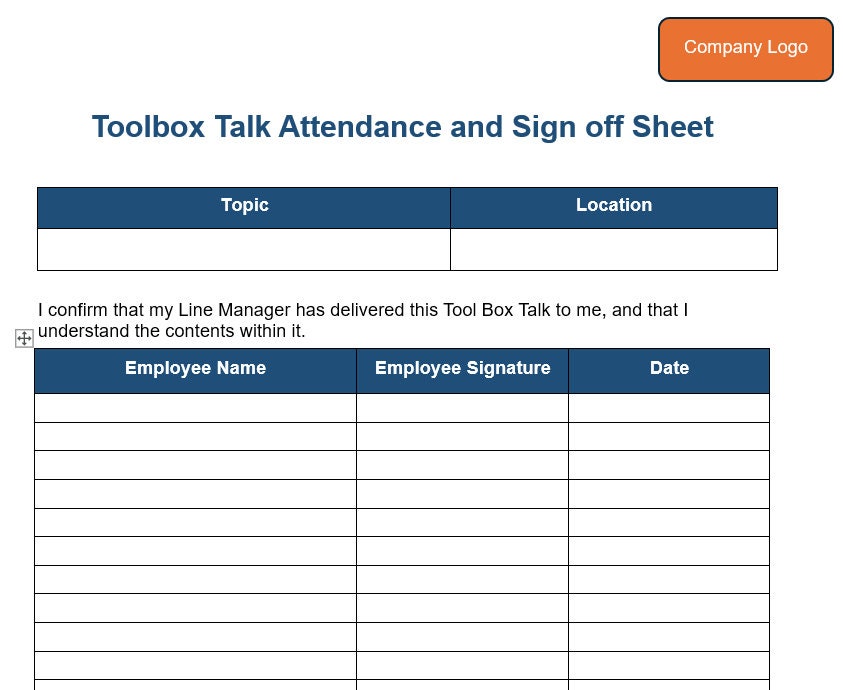
At its core, a toolbox talk template is a pre-formatted document that standardizes the delivery and recording of safety talks. It includes sections for:
- Topic and date
- Location and crew names
- Key hazards discussed
- Control measures
- Attendee signatures
- Supervisor notes
It’s not a script—good templates encourage discussion, not reading. They act as a framework: ensuring consistency across shifts and sites while allowing customization for the day’s work.
Imagine two crews working on the same project but different days. Without a template, one might discuss ladder safety in depth, while the other skips it entirely. With a template, both teams cover the same core points, reducing variability and liability.
Essential Components of an Effective Template
A strong toolbox talk template isn’t cluttered—but it’s thorough. Here’s what every reliable version should include:
#### 1. Header: Context at a Glance - Project name - Date and time - Location (e.g., “East Wing Roof”) - Supervisor name
This ensures talks are traceable and relevant to the task at hand.
#### 2. Clear Topic Title Use plain language: “Working at Heights – Ladder Safety” instead of “Fall Protection Overview.” Specificity drives relevance.
#### 3. Hazard Identification Section List 2–4 key risks tied to the task. For example: - Overreaching on a ladder - Slippery rungs - Unstable footing
#### 4. Control Measures Pair each hazard with a mitigation strategy: - Maintain 3-point contact - Inspect ladder before use - Secure base on level ground
#### 5. Discussion Prompts Include open-ended questions to spark engagement: - “Has anyone experienced a ladder slip? What happened?” - “What’s one thing we can do today to prevent falls?”
This transforms passive listening into active learning.
#### 6. Attendance and Sign-Off Collect names and signatures. This isn’t just bureaucracy—it’s proof of training, required by OSHA and insurers.
#### 7. Space for Notes Supervisors can document observations: “Jake raised concern about icy steps—area cordoned off.”
Common Mistakes That Undermine Template Effectiveness
A template is only as good as how it’s used. Here are the most frequent pitfalls:
- Using the same topic every week: Repetition breeds complacency. Rotate topics monthly.
- Reading verbatim: Templates are guides, not scripts. Encourage interaction.
- Skipping documentation: No signature, no proof. Always record attendance.
- Ignoring job-specific risks: Generic talks on “general safety” lack impact. Tailor to the day’s tasks.
- Scheduling talks after work starts: Hold them before tools are picked up. Attention drops once work begins.
One electrical contractor learned this the hard way after an arc flash incident. Their toolbox talks were well-documented—but all covered fire extinguishers, not electrical lockout. The template existed, but the content wasn’t relevant. Upgrading to task-specific templates reduced near-misses by 60% in six months.
How to Customize a Template for Your Industry
A one-size-fits-all template fails in practice. Here’s how to adapt it:
#### Construction Focus on fall protection, scaffolding, excavation, and crane operations. Use visual aids—photos of correct vs. incorrect setups.
#### Manufacturing Emphasize machine guarding, lockout/tagout (LOTO), and repetitive motion. Include mini-demonstrations.
#### Utilities Cover confined spaces, live-line work, and gas detection. Stress emergency procedures.
#### Landscaping Discuss heat stress, equipment operation (e.g., chainsaws), and overhead power lines.
Pro Tip: Create a 12-month safety calendar. Assign topics monthly (e.g., January = Cold Stress, July = Heat Illness) and rotate weekly subtopics. This ensures coverage and avoids repetition.
5 Practical Toolbox Talk Template Examples (with Use Cases)
Here are real-world examples showing how templates work across scenarios:
#### 1. Fall Protection – Roof Work - Hazard: Unprotected roof edges - Controls: Guardrails, harnesses, warning lines - Discussion: “Where are the fall zones today? Who’s checking anchor points?”
Use Case: Residential roofing crew starts a new house. Supervisor walks edge line, confirms harness use.
#### 2. Excavation Safety – Trenching - Hazard: Cave-in risk - Controls: Sloping, shoring, spoil pile distance - Discussion: “Has soil type changed? Is the trench deeper than 5 feet?”
Use Case: Utility crew digging for sewer line. Daily talk includes soil inspection checklist.
#### 3. LOTO – Machine Maintenance - Hazard: Unexpected startup - Controls: Locks, tags, verification - Discussion: “Who holds the keys? How do we test for zero energy?”
Use Case: Plant mechanic servicing conveyor. Talk confirms lock points and communication plan.
#### 4. Heat Stress – Summer Work - Hazard: Dehydration, heat stroke - Controls: Water breaks, shaded rest areas, buddy system - Discussion: “What are early signs of heat illness? Who’s our hydrator checker?”
Use Case: Highway paving crew. Supervisor assigns water monitor each shift.

#### 5. Night Work – Visibility - Hazard: Poor lighting, vehicle traffic - Controls: Hi-vis gear, lighting setup, spotters - Discussion: “Are all headlamps working? Where are blind spots?”
Use Case: Road repair crew. Talk includes headlamp check and traffic pattern review.
Where to Find or Build a Quality Toolbox Talk Template
You don’t have to start from scratch. Many organizations use one of these approaches:
#### Option 1: Free Industry Templates (OSHA, NIOSH) - Source: osha.gov, niosh.gov - Pros: Compliant, authoritative - Cons: Generic, may need customization
#### Option 2: Safety Software Platforms - Examples: SafetyCulture (iAuditor), Procore Safety, SiteDocs - Pros: Digital forms, auto-scheduling, cloud storage - Cons: Subscription cost, learning curve
#### Option 3: Trade Association Resources - Associated Builders and Contractors (ABC) - National Safety Council (NSC) - American Society of Safety Professionals (ASSP) - Pros: Industry-specific, peer-reviewed - Cons: Membership often required
#### Option 4: In-House Development Create custom templates with input from field crews. Test and refine over 30 days.
#### Option 5: Hybrid Approach Start with a free template (e.g., OSHA’s fall protection example), then adapt with crew feedback and job-specific details.
Editorial Insight: The best templates evolve. Revisit them quarterly. Ask workers: “Was this talk useful? What should we add?”
Turning Templates into Real Behavior Change
A template alone won’t improve safety. It’s the process around it that counts.
- Train supervisors to facilitate, not lecture.
- Rotate topics monthly using a safety calendar.
- Audit usage: Are talks held daily? Are signatures complete?
- Link to incidents: After a near-miss, run a targeted talk using the template.
- Recognize engagement: Praise crews that contribute ideas.
One mining company tied toolbox talk participation to safety bonuses. Within a year, reportable incidents dropped by 42%. The template didn’t change—how it was valued did.
A toolbox talk template is more than paperwork. It’s a ritual of responsibility—a daily commitment to getting everyone home safe. When built with care, customized for the job, and used consistently, it becomes a cornerstone of a strong safety culture.
Don’t just hand out a form. Build a system: choose or design a clear template, train your leads, rotate topics, and document every session. Make safety visible, repeatable, and human.
Start tomorrow: pull your current template (or create one), review it against today’s work, and lead a talk that matters.
FAQ
What should be included in a toolbox talk template? A topic, date, location, hazard list, control measures, discussion questions, and attendance sign-off.
How long should a toolbox talk last? 5 to 15 minutes—long enough to cover key risks, short enough to hold attention.
Who should lead a toolbox talk? Supervisors, foremen, or safety officers—but input from workers is essential.
Do toolbox talks need to be documented? Yes. Signed records prove compliance and training, especially during OSHA inspections.
Can toolbox talk templates be digital? Yes. Many companies use apps like SafetyCulture or Procore to run and store talks electronically.
How often should toolbox talks be held? Ideally daily or before high-risk tasks. Weekly at minimum for low-risk environments.
Are toolbox talks only for construction? No. They’re used in manufacturing, utilities, oil and gas, landscaping, and more—anywhere hazards exist.
FAQ
What should you look for in What Is a Toolbox Talk Template and How to Use It Effectively? Focus on relevance, practical value, and how well the solution matches real user intent.
Is What Is a Toolbox Talk Template and How to Use It Effectively suitable for beginners? That depends on the workflow, but a clear step-by-step approach usually makes it easier to start.
How do you compare options around What Is a Toolbox Talk Template and How to Use It Effectively? Compare features, trust signals, limitations, pricing, and ease of implementation.
What mistakes should you avoid? Avoid generic choices, weak validation, and decisions based only on marketing claims.
What is the next best step? Shortlist the most relevant options, validate them quickly, and refine from real-world results.